

To complete prop firm KYC verification, use the firm’s official dashboard, submit the accepted original identity document, complete the required camera check, and confirm that the dashboard records approval. If verification stalls, identify whether the problem is submission, review, a requested correction, or the account step that follows approval.
Table of Contents
- Check when your firm requires verification
- What documents do you need for prop firm KYC?
- Correct a profile error before repeated submissions
- Complete the actual capture steps
- Why is prop firm KYC pending or delayed?
- A verified identity may leave another task unfinished
- Escalate with the minimum necessary information
- Frequently asked questions
- Can someone else complete KYC for my account?
- Is an upload confirmation the same as approval?
- Should I open another account if verification is stuck?
- Why can I trade but not buy another evaluation?
KYC requirements depend on the firm, account, location, and verification provider. This guide helps you prepare and diagnose the process; it does not establish eligibility for a particular country or document.
Check when your firm requires verification
Do this before assuming KYC is only a payout task. Alpha Futures says verification is required before a Qualified Account and performance fees, and that the contract cannot be signed until KYC is complete. Its help page allows verification before passing the evaluation. Alpha Futures KYC instructions.
Topstep describes another timing model: identity verification is required before a second purchase, including further accounts or resets. Its guidance distinguishes a purchase restriction from a fully locked profile and explains when trading can continue during verification. Topstep identity verification.
The practical question is therefore: What action is this verification blocking on my account? It could be another purchase, an agreement, account activation, or another step identified by the firm. Record that action before troubleshooting. Otherwise, a successful document submission can be mistaken for completion of a different account process.
What documents do you need for prop firm KYC?
Open the official instructions from the logged-in dashboard or the firm’s verified help center. Check accepted document types, expiry requirements, supported countries, camera requirements, and whether another document is requested for your situation.
The official examples below accept government-issued identity documents. Topstep lists a passport, driver’s license or national ID card and requires an unexpired physical original plus a camera for the selfie. Your firm’s accepted list controls the choice. If proof of address or another supporting document is requested, check its permitted age and format in that specific flow.
Avoid preparing a generic folder of sensitive documents “just in case.” Submit only what the designated flow asks for. Keep copies out of public chats and ordinary troubleshooting screenshots.
| Check | What to verify before starting |
|---|---|
| Account identity | The profile belongs to the person completing verification |
| Name | The profile information corresponds to the legal identity being checked |
| Document | The type appears on the current accepted list |
| Validity | The document is unexpired where required |
| Physical access | The original document is available if requested |
| Camera | The device can complete the required document and selfie steps |
| Account access | You can return to the dashboard after submission |
| Next action | You know which purchase, agreement, or activation depends on approval |
These are preparation checks, not instructions for bypassing a failed identity match. If your information is incorrect, use the firm’s correction process.
Correct a profile error before repeated submissions
A mistyped name, a shortened name, and a change of account owner are different issues. Explain the actual discrepancy to support instead of trying several variations until one passes.
Topstep’s dashboard guidance says support can help with minor legal-name corrections, while accounts cannot simply be transferred to another person. It also describes using a single profile for the trader’s accounts. Topstep dashboard guidance.
For a legitimate correction, provide the affected profile field and ask for the secure process. Do not create a second profile to work around a pending review. That can make it harder to connect purchases, verification status, and account ownership.
If your legal name has changed, explain that fact and ask what supporting evidence the firm requires. This guide cannot determine which documents will satisfy that case. The firm’s secure verification process must make that decision.
Complete the actual capture steps
Use a device with a working camera and enough time to finish the flow. Read each instruction before submitting. Check that the document is entirely visible, the image is readable, and there is no glare obscuring the fields the verifier needs.
Topstep specifically calls for an original, unexpired physical ID and a camera-based selfie process, rather than a photocopy or a photograph of another screen. Alpha’s instructions likewise require the account holder to complete the verification personally. Topstep identity verification, Alpha Futures KYC instructions.
If the camera cannot open, check the browser’s permission for the verification page and whether another application is using the camera. If a mobile handoff is provided, use that official handoff and return to the original dashboard afterward. Do not replace the required selfie with an uploaded portrait unless the verification flow explicitly allows it.
After pressing submit, wait for the completion screen. A document selected on your device is not necessarily a document received by the verifier. Save the submission time and any non-sensitive reference number shown.
Why is prop firm KYC pending or delayed?
Different firms use different labels, but these categories help you identify the next action:
| Observed state | What it establishes | Useful next step |
|---|---|---|
| No submission confirmation | Completion is uncertain | Return to the official flow and inspect its state |
| Submitted or under review | A review is pending | Check the stated processing period and requests |
| More information requested | A specific item remains unresolved | Respond through the designated secure process |
| Rejected or unsuccessful | The submission did not satisfy a check | Read the reason and permitted correction route |
| Verified | Identity review is complete | Check the separate agreement or account action |
Do not treat this table as the exact wording of every dashboard. Use it to ask a more precise question about what you see.
Alpha’s KYC page gives a review period of up to 48 hours. That is a published process description, not a guarantee that every unusual case will finish on the same schedule. Check its current wording and any account-specific request before escalating. Alpha Futures KYC instructions.
Check device and location requirements as well. Alpha Futures prohibits VPN or VPS use during its KYC flow, and Topstep cautions that these can create location discrepancies. Follow the firm’s approved process if you need technical help.
Record the timezone when calculating elapsed time. A screenshot showing “yesterday” is much less useful than the full submission timestamp.
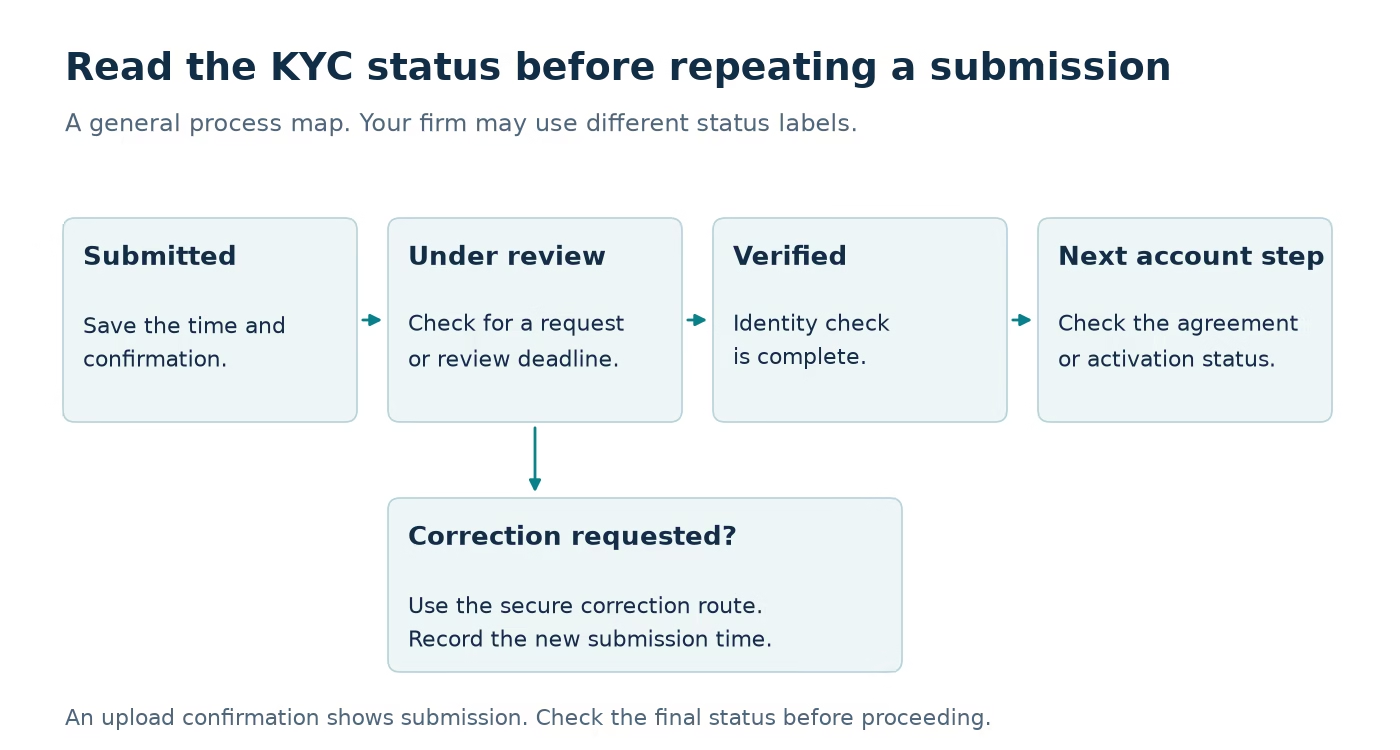
A verified identity may leave another task unfinished
Return to the action that was blocked at the start. If identity status now shows complete, check whether an agreement needs signing, an activation step needs confirming, or the firm needs to issue the next account.
For example, imagine a hypothetical trader who submits documents on Monday, receives verification on Tuesday, and still sees no new account on Wednesday. If the agreement remains unsigned, the useful next action is completing that agreement. Repeating the identity submission would not address the visible blocker.
A simple tracking note separates these events:
- Identity submitted: date, time, timezone.
- Identity approved: date, time, displayed status.
- Agreement completed: date and confirmation.
- Account issued or purchase unblocked: date and account reference.
Keep these records private. The checklist needs process states, not a copy of the identity document itself.
Escalate with the minimum necessary information
Send support the account or profile reference, submission time, current status, any visible error code, and the action that remains blocked. Ask whether the case is awaiting review or requires a correction from you.
For example: “Verification was submitted on [date/time/timezone]. The dashboard currently shows [status]. I cannot complete [specific action]. Is additional information required, and which secure page should I use?”
Do not include passwords, full identity-document images, or a selfie in a public Discord post. If support requests sensitive documents, confirm the designated secure upload route through the official account channel.
When a correction is requested, make that correction once and record the new submission time. Multiple unexplained attempts make your own timeline harder to interpret and may not address the original issue.
Once identity verification is approved, work through the separate steps after passing a prop firm challenge. If the account is active but a withdrawal is pending, use the payout tracking checklist to identify the payment stage.
Frequently asked questions
Can someone else complete KYC for my account?
No one should impersonate the account holder. Follow the firm’s personal verification requirements. If accessibility or technical assistance is needed, ask support for an approved process that preserves the actual account holder’s identity.
Is an upload confirmation the same as approval?
No. It establishes submission. Check the final verification status before assuming the dependent account action is available.
Should I open another account if verification is stuck?
Use the existing profile’s support process first. A new profile does not explain or resolve the status of the original verification.
Why can I trade but not buy another evaluation?
Purchase restrictions and trading restrictions can be separate. Read the precise status and the firm’s current verification policy instead of assuming one permission proves the other.
Connect your alerts with PickMyTrade — automated trade execution, no coding required. Start free →