

If your prop firm payout is approved but the money has not arrived, identify the last confirmed step: firm approval, payment sent, funds received by a payment provider, or bank credit. Ask for the reference and timestamp belonging to that step. An approval email alone does not establish when a bank transfer was initiated.
Table of Contents
- How to find the last confirmed payout step
- Match the published timeline to the correct stage
- How to check a missing Rise payout
- How to track a Wise payout marked complete
- Build one evidence packet for the right support team
- Close the loop when the payment arrives
- Frequently asked questions
- Does approved mean the money has left the firm?
- Should I submit another payout request to fix the delay?
- Can I keep trading while a payout is pending?
- Does a delay prove the payout was denied?
The next useful action depends on where the evidence stops. If the firm has not supplied a transfer reference, start there. If the provider shows a completed transfer, use its receipt and tracking information to investigate the receiving side.
There is no single delivery time that applies to every firm, payout method, currency, or destination. This guide uses official documentation checked on November 9, 2026, alongside an original tracking worksheet. The goal is to turn “Where is my payout?” into a specific question someone can answer.
How to find the last confirmed payout step
Create a short record of the route selected for this request. For example: trading account to payment-provider balance, then a separate withdrawal to a bank. Another request may go directly to a bank through a payment service. Do not assume the route from a previous payout is unchanged.
Use this table as an investigation framework. Its stages are descriptive labels; your provider may use different wording.
| Last confirmed event | Evidence to locate | Next question |
|---|---|---|
| Request submitted | Request ID and timestamp | Has the firm completed its review? |
| Firm approved request | Approval notice | Has payment been initiated, and through which method? |
| Firm says payment was sent | Transfer reference or proof of payment | Which recipient and destination were used? |
| Funds appear at provider | Provider balance or transaction | Is a separate withdrawal required or already submitted? |
| Provider says transfer completed | Transfer receipt | Has the receiving bank located the credit? |
| Bank shows credit | Statement entry | Do amount, currency, and reference reconcile? |
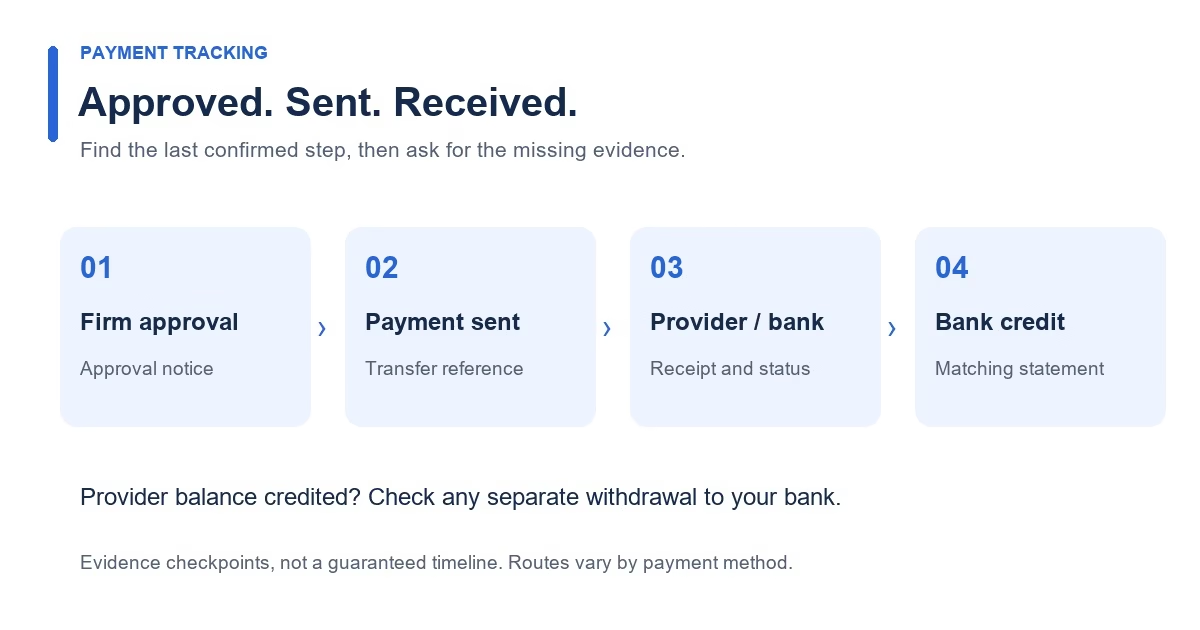
“Processed” is not precise enough. Save the exact wording, then ask what it means: the request was reviewed, the payment was sent, or the bank received it? Record only the step you can confirm.
Also keep the payout request ID separate from any transfer ID. A firm can use one identifier for reviewing the request and another for the payment. Searching the provider’s system with only an internal account number may leave the payment untraceable to its support team.
Match the published timeline to the correct stage
Topstep’s payout policy separates internal approval, listed as one to three business days, from payment-method timelines. It lists different timing for ACH and international wire transfers. Those figures describe its documented process; they do not establish a deadline for a different firm or payment route. Topstep: Payout Policy
Before counting elapsed time, write down:
- Which published interval you are using.
- The event that starts that interval.
- The timestamp and timezone of that event.
- Whether the estimate uses calendar days or working days.
- Any destination, currency, or method conditions attached to it.
If a document does not explain when its clock starts, ask the firm. “Three days since I clicked request” and “three business days since the bank transfer was initiated” describe different measurements.
Here is a hypothetical calendar exercise, with invented timing assumptions. Suppose a payment is initiated on Friday, the estimate starts on the next working day, and Tuesday is a relevant bank holiday. Monday is day one, Wednesday day two, and Thursday day three. This is not a payout promise; it shows why a calendar subtraction can misstate an interval expressed in working days.
Wise says transfers made around weekends or holidays may wait until the next working day for processing. Its tracking view provides an updated arrival estimate and information about delays. Use the estimate attached to the actual transfer when it is available. Wise: Track a transfer
How to check a missing Rise payout
For a Rise route, confirm that the payer used the email associated with your Rise account and that the payer invitation has been accepted. Rise describes the invitation as the connection between the payer and recipient. Where an agreement is required, both parties must complete it before payment processing. Rise: How to get paid
Check the relevant workspace as well as your inbox. Rise’s onboarding guide explains that the payer-linked workspace appears after the invitation is accepted; it also directs recipients to outstanding documents and withdrawal-method setup. A working login alone does not prove that the payer relationship is complete. Rise: First steps after onboarding
Record what you actually see: no invitation, invitation accepted, document awaiting your signature, document awaiting the payer, or payment visible. That observation gives support something concrete to investigate.
If funds are visible at the provider but absent from your bank, begin a new line in the tracking worksheet for the provider-to-bank withdrawal. Include its own amount, date, destination, and reference. Keep the firm’s completed payment and your later withdrawal distinguishable so neither support team is asked to trace the wrong leg.
How to track a Wise payout marked complete
Wise defines “Complete” as money sent to the recipient bank. It explains that the receiving bank may still need time to release the funds. Its guidance is to obtain the transfer receipt so the bank can locate the payment. Wise: Completed transfer not received
First verify whose Wise transfer is being discussed. The firm’s transfer to you and your withdrawal from a Wise balance are separate transactions if both exist. A screenshot of one does not establish the status of the other.
Then compare the receipt with the receiving statement. Wise notes that the sender can appear as Wise or a banking partner, and a currency conversion can change the displayed amount. Search by reference and reconcile the destination currency rather than checking only for the prop firm’s name and the original dollar amount. Wise: Recognizing a completed payment
If the expected arrival estimate has passed, Wise’s recipient guidance recommends asking the sender for proof of payment, including the parties, date, amount, and currency. It also describes checking for pending account tasks and recipient-detail errors. Wise: Expecting money that has not arrived
Still no matching credit? Send the receipt to the receiving bank and ask it to locate the payment. Keep the sender involved if the bank cannot find it.
Build one evidence packet for the right support team
A useful ticket is a compact reconciliation, not a collection of unrelated screenshots. Put the transaction details in chronological order and state which confirmation is missing.
| Field | Your entry |
|---|---|
| Firm and account | Firm name, account identifier, plan |
| Payout request | ID, requested amount, currency, submission time |
| Approval | Timestamp and exact status wording |
| Sending evidence | Initiation date, payment method, transfer reference |
| Recipient route | Provider and masked destination details |
| Provider status | Current wording, timestamp, arrival estimate |
| Receiving evidence | Whether a matching credit appears |
| Specific request | Missing reference, clarification, or trace needed |
Use the support channel published in the firm or provider’s own account area. Keep account documents and complete banking details out of public community messages. For Rise specifically, its payment guide says the payer uses your account email; it should not require your passkey or login credentials to pay you. Rise: Information needed to receive payment
A concise ticket can follow this format:
My payout request has an approval notice, but I cannot yet match it to a payment in the selected destination. I have attached the request ID, amount, approval timestamp, and current destination status. Please confirm whether payment has been initiated and provide the transfer reference, recipient destination, and applicable arrival estimate. If it has not been initiated, please identify the outstanding step.
For a transfer already marked complete, change the request to ask the receiving institution to locate the credit using the attached receipt. The useful question changes as the evidence advances.
Keep one chronology and append new responses. If support confirms a corrected destination, returned transfer, or reissued payment, record the new reference separately. This prevents an old receipt from being mistaken for evidence about the replacement.
Close the loop when the payment arrives
Match the received amount and currency to the final receipt, then reconcile any separate split or fee entries with the records supplied. Mark the bank-credit timestamp in the worksheet instead of deleting the earlier status history.
That completed chronology gives you a reference for future requests through the same route. It remains an observation about one transaction, not a guaranteed service standard. If a later payout takes a different route, start its record from the applicable documentation and actual timestamps.
If no transfer can be found after the stated estimate, request a written trace update from the party that initiated it. Ask which step is pending and which reference will be used for follow-up. An explicit investigation status is more useful than repeatedly asking for an arrival date unsupported by the payment record.
Frequently asked questions
Does approved mean the money has left the firm?
Establish that from the firm’s status definitions or sending confirmation. Approval can identify a completed review without supplying a bank-transfer timestamp. Ask for payment initiation evidence and a reference before starting a delivery clock that depends on the funds having been sent.
Should I submit another payout request to fix the delay?
First clarify the existing request. Another request does not identify where the original payment is, and it can add a second transaction to reconcile. Ask whether the existing payment is pending, returned, cancelled, or requires a specific corrective action before treating it as a new withdrawal problem.
Can I keep trading while a payout is pending?
Use the rule for your exact account stage and request status. Do not infer trading permission from a provider’s transfer status. If the firm’s documentation is unclear, ask whether trading is permitted and which balance and loss threshold apply during processing. Payment tracing and account-risk permissions are separate checks.
Does a delay prove the payout was denied?
The absence of a bank credit does not identify the cause. Look for the firm’s actual decision, sending evidence, provider status, and receiving record. If the firm has issued a denial, ask for that decision and its stated basis; if it has initiated a payment, trace the transaction using its reference.
Before returning to the trading account, calculate the drawdown buffer left after your payout. A payment still in transit does not tell you which balance or loss floor currently applies.
Connect your alerts with PickMyTrade — automated trade execution, no coding required. Start free →