
Firm and platform examples checked on 11 November 2026. Account-specific terms can differ.
Table of Contents
- Start with the account, not the checkout button
- Does a reset change the renewal date at Alpha Futures or Topstep?
- Compare the next two charges, not just today’s price
- Check what happens to progress
- A failed evaluation is not proof of cancellation
- Send a support question that can be answered
- Frequently asked questions
- Does buying a new evaluation cancel the old one?
- Should I reset immediately after failing?
- Can a reset restore a funded account?
- What should I check after payment?

A prop firm evaluation reset restarts specified trading-account measurements. A rebill renews a subscription. They are separate events, and buying a reset does not necessarily postpone the next subscription payment. Before paying, check the exact evaluation, its renewal date, what the reset changes, and whether renewal already includes a reset or credit.
That distinction surfaced in the archived Alpha Futures Discord on 8 October 2026: a trader whose evaluation had just renewed asked whether the account would reset or keep its progress. The answer depends on which evaluation renewed and whether it was still active.
Start with the account, not the checkout button
Open your billing page and trading dashboard side by side. Write down the account identifier, program, size, platform connection, current status, next renewal, and subscription amount. A label such as “50K evaluation” is not enough if you have several accounts of that size.
Keep a screenshot of each page before making a change. The useful record includes a timestamp and the relevant account number; it does not need to contain payment-card details. This gives you a way to distinguish an account-selection mistake from a billing problem later.
Then identify the outcome you actually need. Restarting a failed evaluation, preserving progress on an active evaluation, stopping future charges, and opening an additional evaluation are four different jobs. A button that solves one may do nothing about the others.
| Action | Question to answer before confirming |
|---|---|
| Buy a reset | Which measurements restart, and does the renewal date move? |
| Let the account renew | Is progress retained, reset automatically, or subject to a choice? |
| Apply a reset credit | Does the credit match this account’s size and program? |
| Cancel a subscription | Which account loses renewal, and when does access end? |
| Buy another evaluation | Will the original subscription continue charging? |
Does a reset change the renewal date at Alpha Futures or Topstep?
Alpha Futures states that an evaluation reset does not change the monthly renewal date. Its subscription guidance distinguishes failed evaluations, which reset on renewal, from active evaluations, where the dashboard offers a choice to keep progress or reset 24 hours before rebill. Buying another account or a reset does not move an existing subscription’s billing date. Check the current account-specific options in the dashboard. Alpha Futures reset guide, monthly subscription guide.
For a concrete price check, Alpha Futures listed a $109 reset and a $129 monthly evaluation fee for its 50K Standard plan on November 11, 2026. If both charges fall inside your comparison period at those listed prices, that is $238 before any applicable taxes or discounts. An eligible failed account that waits for the scheduled rebill would incur the $129 renewal in that same example.
Topstep describes a different arrangement: purchasing or applying a Trading Combine reset moves renewal 30 days from that reset. Renewal also provides a reset credit, with restrictions on which account size and type it can serve. A Trading Combine reset is not a reset of an Express or Live Funded Account. Topstep reset guide.
Those examples explain why a friend’s experience at another firm is an unreliable billing instruction. Even within one brand, an older account, a different program, or a promotion may have separate conditions. Save the policy that matches your purchase rather than relying on a search-result snippet.
Compare the next two charges, not just today’s price
Build a short timeline before deciding. Include any payment due today and the next scheduled renewal. A discounted reset can look inexpensive while leaving a subscription charge only a few days away.
Consider a hypothetical evaluation with a $90 reset and a $140 monthly subscription. Suppose you buy the reset on 24 November and the next renewal is 27 November. These are invented prices for explaining the calculation, not current prices at either firm above.
| Hypothetical policy | Payment today | Next renewal | Payments through 27 November |
|---|---|---|---|
| Reset leaves renewal unchanged | $90 | 27 November, $140 | $230 |
| Reset moves renewal 30 days | $90 | 24 December, $140 | $90 |
| Wait for renewal, where a reset is included | $0 | 27 November, $140 | $140 |
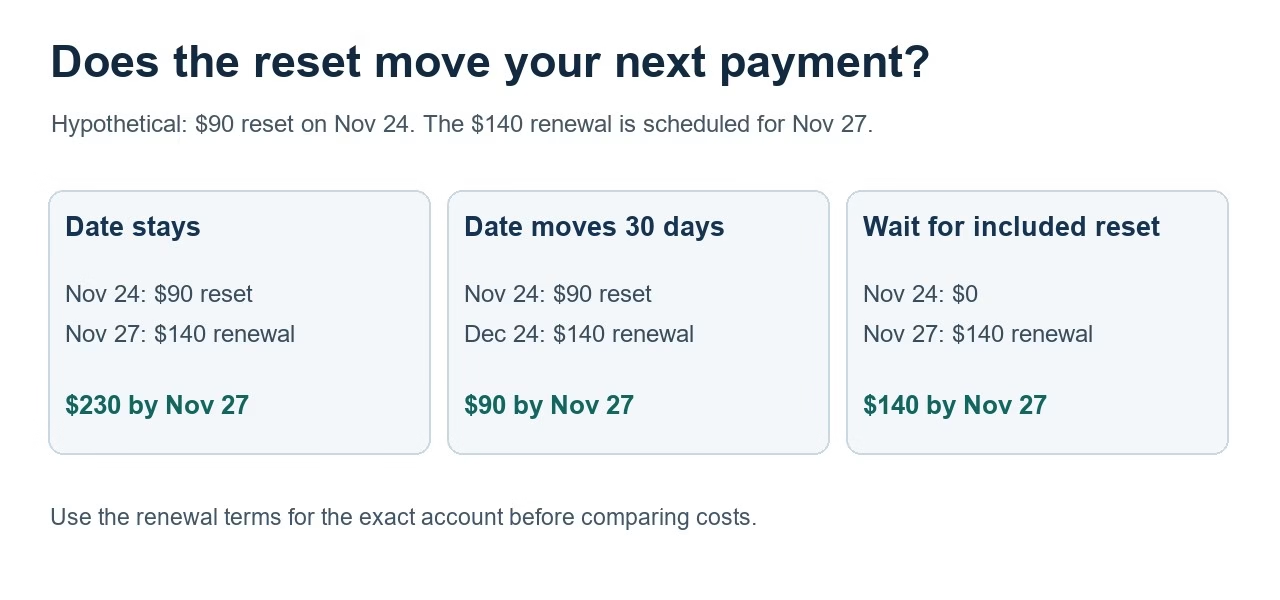
The table does not say which choice is best. Waiting means not using a failed account in the meantime, and the included-reset condition must actually apply. The point is to compare equivalent periods and confirmed terms.
Use this calculation in your own worksheet:
Cash due within the chosen period = reset charges + subscription renewals + any separately confirmed fees.
List taxes or currency-conversion charges separately if they appear at checkout. Do not assume a promotion covers renewals just because it reduced the first payment. Record both the first-payment price and the recurring price shown in the agreement.
Check what happens to progress
Before confirming a reset, capture your current balance, loss threshold, trading-day count, and any other evaluation measurements that matter to that program. Then read the reset definition beside each field. If the documentation names only some measurements, ask about the others instead of treating “reset” as a universal erase button.
This matters particularly when an evaluation is still active. Someone who wants another month to complete the existing account may not want to restart progress. Someone with a failed account may need a reset before any further trading is possible. Those are different situations even when both people see the same renewal amount.
After the change, compare the dashboard with the expected state. Check the account identifier again before placing an order. If the balance or renewal date does not match the confirmation, keep trading paused on that account while the discrepancy is clarified. Another purchase is not a useful diagnostic test.
A failed evaluation is not proof of cancellation
Topstep says a Maximum Loss Limit violation does not itself cancel the Trading Combine subscription. Passing ends the subscription for that passed account, while other active subscriptions continue unless separately canceled. Its subscription page also explains the consequences of cancellation. Topstep Trading Combine subscriptions.
Treat cancellation as its own completed action. Save the cancellation confirmation and check the account-specific billing status. A dashboard showing “failed” describes a trading outcome; it is not a receipt for stopping payments.
For several evaluations, use one row per account:
| Account ID | Trading status | Renewal date | Intended action | Confirmation saved |
|---|---|---|---|---|
| Example A | Failed | Enter date | Reset, renew, or cancel | Yes/No |
| Example B | In progress | Enter date | Preserve progress or cancel | Yes/No |
| Example C | Passed | Enter date/status | Verify subscription ended | Yes/No |
This is especially helpful when similarly named accounts appear on separate platform logins. Reconcile the billing identifier against the trading account rather than assuming the order of accounts on screen is consistent.
Send a support question that can be answered
If a billing date or reset credit remains unclear, include the account ID, program, current status, displayed renewal date, and the specific action you are considering. Attach a cropped screenshot with sensitive payment details hidden.
A useful message is: “For evaluation [ID], currently [status], will purchasing the reset shown today change the renewal date displayed as [date]? If I do nothing, will renewal preserve progress, reset this account, or issue a separate credit?”
That asks for a concrete account-level answer. A broad question such as “How do resets work?” may produce a general help link that still leaves the purchasing decision unresolved. Save the response with the receipt if you proceed.
For an evaluation at a different firm, check the rules for its own account type. Our OneUp Trader rules guide covers another example.
Frequently asked questions
Does buying a new evaluation cancel the old one?
Do not assume it does. Check the old subscription directly. A new purchase and an existing renewal are separate records unless the firm’s terms explicitly connect them.
Should I reset immediately after failing?
First compare the reset terms, next renewal, available credits, and your intended return date. This guide explains the account mechanics; it does not recommend buying another evaluation or increasing trading activity.
Can a reset restore a funded account?
An evaluation reset is not automatically available for a funded-stage account. Look for the specific funded-account recovery policy and eligibility instead of purchasing an evaluation reset to solve a different account problem.
What should I check after payment?
Verify the correct account changed, the expected measurements restarted, the renewal date matches the receipt, and no unwanted second subscription remains active. Keep the confirmation before resuming trading.
Connect your alerts with PickMyTrade — automated trade execution, no coding required. Start free →